
 |
| Asus Zenfone 3 Laser |
Last month, I reviewed the Asus Zenfone 3 (ZE520KL)
smartphone, which turned out to be a premium smartphone at perfect price. You can check my Asus Zenfone 3 (ZE520KL)
Review here.
Today, I will be reviewing, actually I will be comparing two
different Zenfone 3 series smartphones which are priced similarly – the Asus
Zenfone 3 Max (ZC553KL) and the Asus Zenfone 3 Laser (ZC551KL). Both, the
Zenfone 3 Max and Laser come with unique selling point of Max battery and Laser
auto-focus respectively.
The Zenfone 3 Max was launched in India three months after the
initial launch of the Zenfone 3 Laser. Asus Zenfone 3 Max is available in two different
variants which include a 5.2-inch Zenfone 3 Max (ZC520TL) and a 5.5-inch
Zenfone 3 Max (ZC553KL), whereas the Zenfone 3 Laser comes in just 5.5-inch
display option. I will be comparing the 5.5-inch variant of Zenfone 3 Max with
the Zenfone 3 Laser.
The 5.2-inch Zenfone 3 Max is available in India for Rs.
12,999 and the 5.5-inch Zenfone 3 Max costs Rs. 16,999. Similarly, the Zenfone
3 Laser is available for Rs. 16,999. Priced similarly, let’s see which model of
Zenfone 3 series is worth buying at Rs. 16,999.
 |
| Asus Zenfone 3 Max |
Asus Zenfone 3 Max ZC553KL vs Asus Zenfone 3 Laser ZC551KL (Specs comparison) –
- 5.5-inch Full HD display
- 64-bit Octa-Core Qualcomm Snapdragon 430 processor
- Adreno 505 GPU | 3GB (Max) / 4GB (Laser) RAM
- Zen UI 3.0 based on Android 6.0 Marshmallow
- 16MP (Max) / 13MP (Laser) rear camera | 8MP front-facing camera
- 32GB internal storage with up to 128GB microSD card support
- 4100mAh (Max) / 3000mAh (Laser) battery
- 4G LTE with VoLTE, WiFi 802.11 b/g/n, Bluetooth 4.1, GPS
- Fingerprint scanner | dual-SIM support (Hybrid slot)
- Zenfone3 Max: Dimensions - 151.4×76.24×8.3mm | Weight - 175 grams
- Zenfone3 Laser: Dimensions - 149 x 76 x 7.9 mm | Weight - 150 grams
Looking at the specifications, it is quite clear that Asus
is not compromising the Zenfone 3 Max in terms of internal components for
larger battery when compared with the Zenfone 3 Laser, which also comes with
same internal components. Thumbs Up!
 |
| Asus Zenfone 3 Max |
 |
| Asus Zenfone 3 Laser |
Box Contents
Both, the Zenfone 3 Max and the Zenfone 3 Laser house a rectangular
box design with device image and name on the front. After opening the box, first
thing that you will see is the device itself followed by user guide, warranty
card, SIM slot ejector tool and charging adapter.
Surprisingly, Asus has included premium quality in-ear
earphones with some extra ear plug caps in the Zenfone 3 Laser, whereas the
same is missing inside the Zenfone 3 Max. To compensate, Asus has included an
OTG cable (more details under battery section) inside the Zenfone 3 Max box.
Design & Build Quality
Asus has improved drastically in terms of designing their smartphones
with the introduction of the Zenfone 3 series. The original Zenfone 3 has
premium design and build quality. Talking of the Zenfone 3 Max and the Laser,
both these devices are no-exception. When compared to their predecessors, the
new Max and Laser come with better design and build quality.
Besides having a 5.5-inch huge display, the smartphones are
handy and can be used easily using one hand. The front of Zenfone 3 Max house capacitive
buttons (back, home and menu) below the display with front camera and sensors on
either side of the earpiece, which is placed above the display. You will find
the same arrangement on the Zenfone 3 Laser.
Like every other Asus smartphone, the capacitive buttons are
non-backlit, which is a big disappointment considering the price we are paying.
Differentiating both the devices from the front is quite difficult, but when it
comes to the back, which is made out of aluminum, you can differentiate between
Max and Laser by looking at the camera hump or fingerprint scanner design. The Zenfone
3 Max is winner for me.


Asus Zenfone 3 Laser


Asus Zenfone 3 Laser
 |
| Asus Zenfone 3 Laser |
Antenna bands, camera module, dual-LED flash, Laser
autofocus and fingerprint scanner are all you can find on the back of the
devices, obviously along with Asus branding. Fingerprint scanner on the Max has
a square shaped design with rounded corners, whereas the one the Laser has a
vertical rectangular design with rounded corners, similar to the one on the Zenfone
3.
Fingerprint scanner on both the devices is pretty fast and
accurate. It even works when the device is in standby mode. On the right side
of the device, you will find volume rockers followed by power / lock button
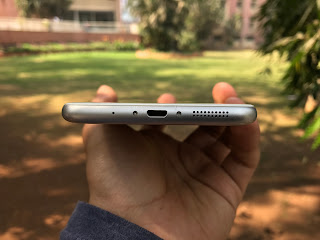
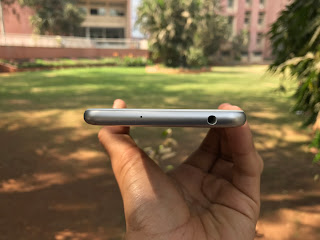
with SIM slot tray placed on the left. On the bottom lies speaker, microUSB
charging port and microphone, and on the top, we have the 3.5mm headphone jack
with secondary microphone.
The Zenfone 3 Max is quite heavy when compared to the
Zenfone 3 Laser, all because of mammoth battery capacity. Asus has worked well
on the back of the devices, as they come with matte finish which sort of helps
in gripping. Though, both the devices are a bit slippery. On the front, you
will find 2.5D curved Corning Gorilla Glass 3, which helps in resisting the
device display from scratches.




Asus Zenfone 3 Max


Asus Zenfone 3 Max
 |
| Asus Zenfone 3 Max |
Pros
|
Cons
|
Simple Design
|
Slippery
|
Rigged Build
|
Display
Both the Zenfone 3 Max and the Zenfone 3 Laser come with a
5.5-inch Full HD IPS display with pixel density of 401 ppi. Talking
specifically about the Zenfone 3 Max first, the device has a 73% screen-to-body
ratio, compared to 77% screen-to-body ratio of the Zenfone 3 Laser. In terms of
numbers, the Max has up to 450nits of brightness for outdoor visibility and the
Laser has up to 500nits brightness.
Like the Zenfone 3, viewing angles, touchscreen response and
color reproduction are all good. Outdoor visibility is not an issue either, as
the display of both the smartphones are visible under direct sunlight. Auto
brightness lights up the display when necessary, but it does take time at times.
Asus has included an option in Display setting to tweak the
color reproduction of the display, just in case you are not satisfied or want
more warm colors. As a part of ZenUI, you will find Bluelight filter mode on
both the devices for reducing eye strain at night.


Asus Zenfone 3 Laser
Pros
|
Cons
|
Color reproduction
|
-
|
Brightness under direct sunlight
|
|
Viewing angles
|
Software
Honestly, I’m not a big fan of Asus’ proprietary ZenUI 3.0
software. You can check my detailed review on Software of Asus smartphones
here.
Asus Zenfone 3 Max and Zenfone 3 Laser, both run on Android
6.0.1 Marshmallow out-of-the-box. This forked version of Android from Asus is
lightweight when compared to its competitors and also house an app drawer. The ZenUI
is sleak and simple to understand, but the only issue with proprietary software
is inclusion of Bloatware. ZenUI is no exception, as Asus has included huge
amount of bloatware.
Besides having so much of bloatware, the UI is very smooth
and responsive. At times, we did experience lag on both the devices, which I
feel is negligible.


After setting up the device, you will find three pages full of pre-installed apps from Asus. To give you an estimate, you will find around 25-30 apps from Asus pre-installed. Some are good enough to get uninstalled, others you have to disable them to keep your app drawer clean or root and uninstall them for extra storage. Due to unnecessary apps, the notification panel is flooded with push notifications which aren’t really worth reading.
You can customize almost everything in ZenUI from changing the font style, font size, icon alignment, icon size, scroll effects, icon label color and much more. Customization also include lockscreen, notification panel, homescreen and even native pre-installed apps. In order to find the customization option, head over to preferences setting of ZenUI.
You can customize almost everything in ZenUI from changing the font style, font size, icon alignment, icon size, scroll effects, icon label color and much more. Customization also include lockscreen, notification panel, homescreen and even native pre-installed apps. In order to find the customization option, head over to preferences setting of ZenUI.
ZenMotion settings include Touch Gesture, Motion Gesture and
One Hand Mode. Other common settings include glove mode, easy mode, kids mode
and screenshot settings. You can also capture game screenshots, record game
sessions and even broadcast live gaming videos to YouTube and Twitch using
Asus’ in-built Game Genie feature.


Pros
|
Cons
|
Lightweight UI
|
Huge amount of bloatware
|
Camera
Let us divide this section for both the smartphone. First, I
will talk about the Asus Zenfone 3 Laser, whose USP is camera and laser
autofocus.
Asus Zenfone 3 Laser
In terms of numbers, the Zenfone 3
Laser comes with an 13MP Sony IMX214 rear camera with dual-LED real tone flash,
f/2.0 aperture, 32-second long
exposure, Blue Glass IR filter and most importantly laser autofocus paired with
Ultrafast TriTech Autofocus technology for focusing objects in just 0.03
seconds.
These are just numbers, in reality the camera of Asus
Zenfone 3 Laser, in my opinion is above average. Laser autofocus is good but in
my testing, it wasn’t really helping me focus on far objects ultrafast. Close
objects were getting focused rapidly. Color reproduction and image details were
rich when captured in daylight, but in low-light the images had noise.
The Zenfone 3 Laser also has 3-axis Electronic Image Stabilization
(EIS), which was helpful while recording videos. EIS helps in smoothing the
transition of videos and stabilize the same so that the video appears shake
free.





 |
| Asus Zenfone 3 Laser |
Asus Zenfone 3 Max
Talking
of the Zenfone 3 Max, the smartphone comes with a 16 megapixels PixelMaster 3.0
camera with dual-LED real tone flash, 1/3" sensor size, f/2.0 aperture, Ultra-fast 0.03 sec
instant focus and subject tracking using Asus TriTech Autofocus technology
which include 2nd gen laser autofocus, phase detection auto-focus
and continuous auto-focus along with real-time HDR and 32-sec long exposure.
The camera of Zenfone 3 Max is similar to the one found on
the Zenfone 3 Laser. Daylight images were sharp and crisp, but in low-light the
camera underperformed and produced noise. Color saturation is another issue, at
times, the color reproduction is too dull for an image. Depending on the lighting
condition, my camera opinion of the Zenfone 3 Max changes.





 |
| Asus Zenfone 3 Max |
Both the smartphones come with an 8MP front facing camera
with the one on the Zenfone 3 Laser has an f/2.0
aperture and the one on the Zenfone 3 Max house an f/2.2 aperture. Again, both the devices perform similarly. Selfies are decent and not great. Low-light
selfies produce a lot grain and aren’t very sharp.
Asus has stuffed the camera application of ZenUI with
plethora of camera modes for every scenario like low-light, night, slow motion,
time lapse, HDR and more.
One of the best feature of both the smartphones camera app
is manual mode. Using manual mode, you can easily play with white balance (WB),
exposure value (EV), ISO, shutter speed and focus, to capture perfect image or
even record professional video. If you aren’t camera geeky you will definitely
be using Auto Mode all time, but some of the modes which are worth discussing
are Super Resolution and Night.
Super Resolution (SRES) mode takes several shots and stich
together to form a 60MP shot. Images clicked using SRES mode are more detailed
and less noisy. Night mode on the other hand, is a nice touch to camera app
when clicking images at night. Images clicked at night using this mode are more
detailed than auto mode and are less noisy too.
Pros
|
Cons
|
Daylight images
|
Lowlight images & selfies
|
Manual Mode
|
Noise and grains
|
Plethora of modes
|
Performance
The biggest downside of both the Zenfone 3 Max and the Laser
is its old-school processor. The devices come with 64-bit Octa-Core Qualcomm
Snapdragon 430 processor clocked at 1.4GHz, which is quite old when compared to
new smartphones launched in the same price bracket. The processor is accompanied
by Adreno 505 GPU.
Surprisingly, Asus has included 4 gigs of RAM inside the Zenfone
3 Laser and 3 gigs of RAM inside the Zenfone 3 Max, and has priced both of them
at Rs. 16,999. On the storage front, the devices come with 32GB internal
storage with expandable memory support using microSD card. As the smartphones
come with hybrid SIM slot tray, you can either use dual-SIM at once or single
SIM and microSD card.
Talking of real life performance, the devices performed
well. There was no lag in normal usage, but while heavy multi-tasking the device
did slow down. Playing graphic intensive games is not a good option on these
devices as you might face small amount of lag and device do heat up warmly.
Most of the time the performance was snappy.
Pros
|
Cons
|
Smooth Performance
|
Old-school processor
|
Heavy Gaming
|
Battery
Finally, it’s time to talk about battery, the major USP of the
Asus Zenfone 3 Max. Asus has include a 4100mAh battery inside the Zenfone 3
Max, which is huge but disappointing when compared to its predecessor which had
a 5000mAh battery.
While using the device for the first time, it lasted more
than a day producing SoT of more than 9 hours. On normal usage, you can use the
device easily for one day and more or two days. And on moderate or heavy usage,
the device can last till you sleep or a bit more producing SoT of 6 to 9 hours.
Charging the device isn’t a big issue, as it supports fast charging and can be
charged completely in around 4 hours.
Asus has also included an option of reverse charging, which
allows the Zenfone 3 Max to charge other devices. For the same, Asus has
included an OTG cable inside the box, using which you can charge other devices.


Asus Zenfone 3 Max
Talking of the Zenfone 3 Laser’s battery performance, the
smartphone comes with an 3000mAh battery. The battery backup of Zenfone 3 Laser
was good, but not the best when compared to the Zenfone 3 Max, that’s quite
obvious.
The device was able to last easily till the end of the day,
but you can’t expect it to last more than a day if you are a moderate or heavy
user. Asus has not included fast charging support inside the Zenfone 3 Laser.
Pros
|
Cons
|
Battery Backup
|
microUSB Port
|
Verdict
Asus initially launched the Zenfone 3 Max in India with a
price tag of Rs. 17,999 and the Zenfone 3 Laser in the India for Rs. 19,999.
Fortunately, both the smartphones are now available in the market for Rs.
16,999.
If I have to judge the pricing with the offering, then I will
definitely say a big NO to both these smartphones. The smartphones do provide
quality build and great battery life, but you really can’t ignore the
old-school processor and most importantly the bucks you are thinking of paying
for these devices.
At Rs. 16,999, you can think of buying much better specced
smartphone like Xiaomi’s Redmi Note 4 or Motorola’s newly launched Moto G5 Plus
or even Redmi 3S Prime.
Still, if you are an Asus fan and looking for either of
these smartphones, then my bet will be on the Asus Zenfone 3 Max, as it provides
great battery life and has similar camera quality like the Zenfone 3 Laser. I
really hope Asus price their upcoming smartphones in India well, as pricing is
one of the biggest factor in the Indian market and if not priced accurately,
then do expect low sales.
If you are interested in buying the Asus Zenfone 3 Max ZC553KL
or the Asus Zenfone 3 Laser ZC551KL, then you can head over to Flipkart or
Amazon or Snapdeal by clicking below links –
Asus Zenfone 3 Laser ZC551KL – Flipkart


 To be updated...